How do coin counters & sorters work, and are they accurate?
September Sale! Use the code SEPTEMBER10 to get 10% off!
We're moving our warehouse. Your order will ship from October 2nd.
 468 Google reviews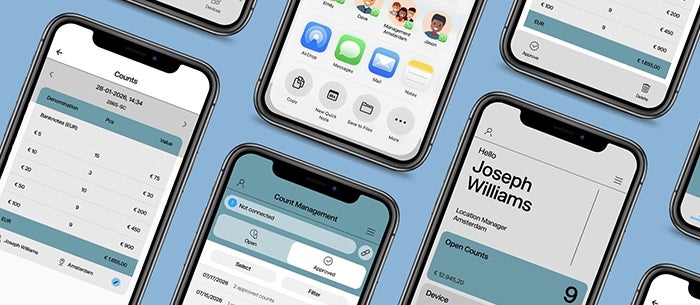
Managing your results has never been easier. The brand new Safescan app allows you to review, approve, and share your results - all from the palm of your hand. Read along to learn more about the app and how it can make your cash counting tasks even smoother.
Upload your results straight from your device to your phone - with just the push of a button. All you have to do is connect the app, count your cash, open the report menu on your banknote counter and click on the send icon. No cables. No complicated steps. No waiting.
Once your results are uploaded to the app, you can review any detail you like. Need to change the name or location linked to the count? You can do that too. Easy and convenient.
Approving your results is just as easy. Simply click the approve button and confirm the approval. That’s it! No more paperwork to fill out or signatures to sign. The app gives your count an official stamp of approval, straight from your phone.
All your approved counts are stored securely in the app where you can access them whenever and wherever you need. Easily view what count was approved when and where without having to access your computer or dig through paper files.
Need to share or file your results? No problem! The Safescan app makes sharing effortless. All you have to do is click the share button to send an Excel file with your results to your team via email, Teams, WhatsApp, and more.
You can also upload the counting results to your own cash management software. Simply save the results on your phone and upload the Excel file to your software. It’s that easy!
The Safescan app automates your cash administration from start to finish.
The Safescan app does more than process your results. It also helps you get the most out of your device. All support centre articles and manuals are available in the app so you always have the answers you need - close at hand.
The app also let’s you know when it is time to update your device. Whenever one is available you will receive a notification so you can easily download and install it. Guaranteeing the best user experience and results.
Ready to get started? It’s easy! Simply download the app directly from the App Store or Google Play Store.
Please note that the Safescan app currently only works with the Safescan 2485-SC, 2865-SC, 2985-SC, and 2995-SC. Want to learn more about how these banknote counters work with the app? Watch our instruction video.
Want to stay up-to-date on all our products? Subscribe to our newsletter for regular insights, exclusive promotions, and special member benefits.