-
Free shipping from $39.
We offer free shipping for all orders with a value of $39 or more.
-
Same day shipping.
Not satisfied? You can return your products within 30 days.
-
3 year warranty. Read more.
Safescan products come with a 3 year warranty
-
American support.
Your trusted cash handling expert for more than 20 years.
Special Sale! Use the code BILL10 for 10% off all bill counters
4.8  468 Google-reviews
468 Google-reviews
Email us: Contact Form and call us: 1-844-386-1192
Safescan 2985-SC & 2995-SC - Creating Pre-Sets
-
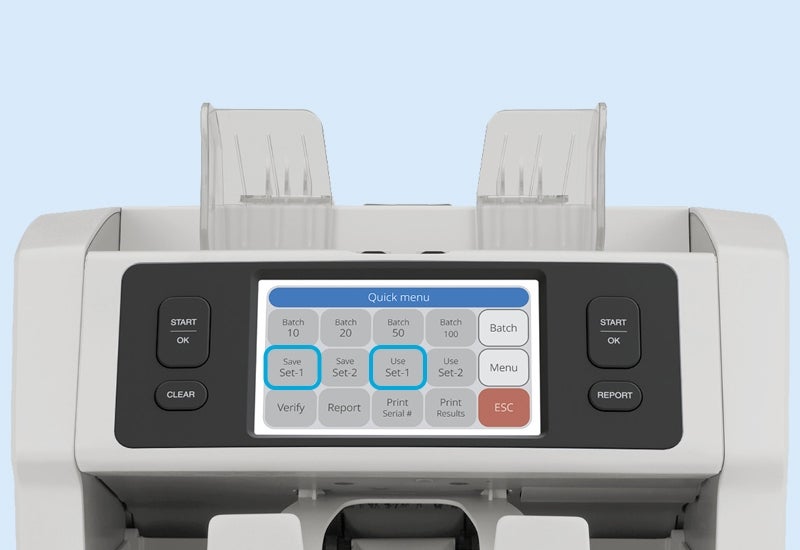
Get started in no-time! Follow the instructions below to create your own pre-set with all your favorite settings.
1. Activate all the settings as you want them to be.
2. Tap the center of the screen to open the quick menu.
3. Select Save Set-1 or Save Set-2. The device has now stored your settings.
4. Press ESC on the screen to exit the quick menu.
6. Next time you switch on the device, go to the quick menu and select Use Set-1 or Use Set-2 (dependent on which one you chose earlier).
To overwrite the settings you have chosen, simply change your settings and click Save Set-1 or Save Set-2 again.
View all Safescan 2985-SC and Safescan 2995-SC articles
-