-
Free shipping from $39.
We offer free shipping for all orders with a value of $39 or more.
-
Same day shipping.
Not satisfied? You can return your products within 30 days.
-
3 year warranty. Read more.
Safescan products come with a 3 year warranty
-
American support.
Your trusted cash handling expert for more than 20 years.
Special Sale! Use the code BILL10 for 10% off all bill counters
4.8  468 Google-reviews
468 Google-reviews
Email us: Contact Form and call us: 1-844-386-1192
Connecting your TA terminal with Wi-Fi
-
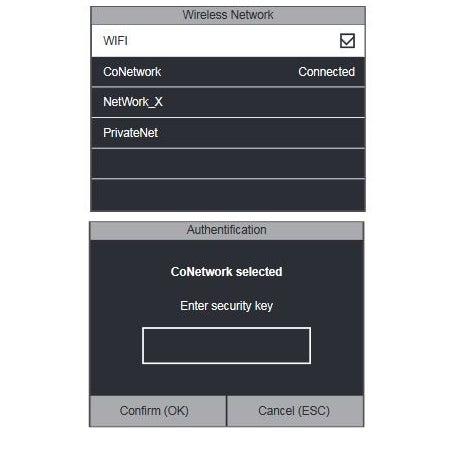
Connecting your TA terminal to your Wi-Fi network can be done by following the steps mentioned below:
Enter the menu of the terminal and navigate to COMM and then select Wireless Network.
Make sure that the WiFi checkbox is checked. A list of all available networks will be shown. Select the network you want to connect to.
The terminal will prompt you for the network password. Enter the password using the keypad of the terminal and confirm.
Wait for the connection to be established. The terminal is now connected to the network using the WiFi connection.
-
-

CONNECT TO WI-FI
Learn how to find Wi-Fi networks and connect your Clocking in System to your company network.

SET-UP A FINGERPRINT
Set-up a fingerprint for each employee to simplify clocking in / out on your Clocking in System.

DOWNLOADS
Most important downloads for your TA-8000 series Clocking in System