-
Free shipping from $39.
We offer free shipping for all orders with a value of $39 or more.
-
Same day shipping.
Not satisfied? You can return your products within 30 days.
-
3 year warranty. Read more.
Safescan products come with a 3 year warranty
-
American support.
Your trusted cash handling expert for more than 20 years.
Special Sale! Use the code BILL10 for 10% off all bill counters
4.8  468 Google-reviews
468 Google-reviews
Email us: Contact Form and call us: 1-844-386-1192
Registering a fingerprint
-
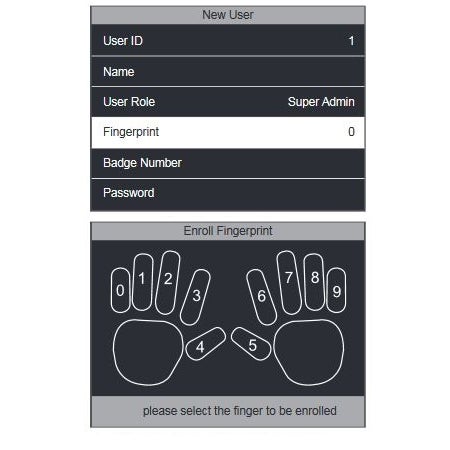
Registering a fingerprint on your TA terminal can be done by following the steps mentioned below:
Enter the menu of the terminal, navigate to the User menu and select New User. Then select the Fingerprint option to register a fingerprint.
Select the finger you want to register, using the arrow keys or the numeric keys.
The system will take your fingerprint 3 times in order to generate a reliable template. When the enrol has been
successful, the system returns to the New User registration page.
The fingerprint has now been registered.
-
-

CONNECT TO WI-FI
Learn how to find Wi-Fi networks and connect your Clocking in System to your company network.

SET-UP A FINGERPRINT
Set-up a fingerprint for each employee to simplify clocking in / out on your Clocking in System.

DOWNLOADS
Most important downloads for your TA-8000 series Clocking in System